Voll ausgebildetes Schwarmfahrzeug
(EN google-translate)
(PL google-translate)
EN: Fully developed swarm vehicle
 Latest swarm simulator version: LUAbot010groundcolor.zip
Corresponding sketch to generate ground picture: LUAbot010b_GROUND_PICTURE.zip
Latest swarm simulator version: LUAbot010groundcolor.zip
Corresponding sketch to generate ground picture: LUAbot010b_GROUND_PICTURE.zip
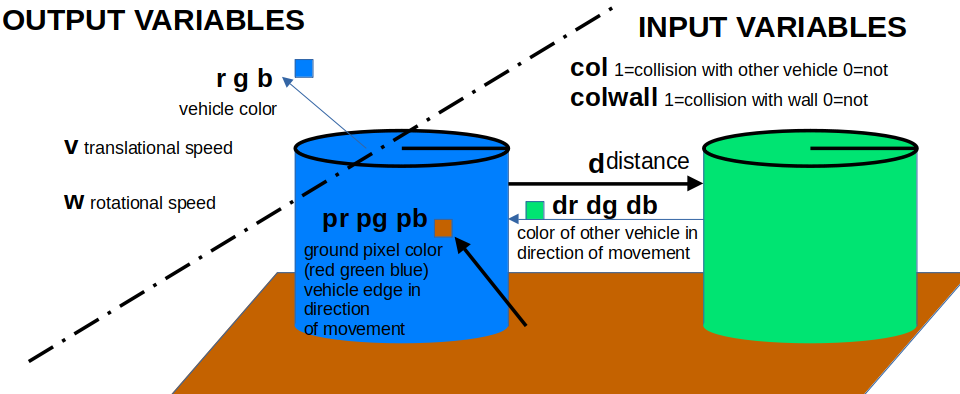
Bild 0-1: Vehikelkonzept / Vehicle Concept.
Die nachfolgend weiter entwickelte Version des LUAbot besitzt bereits:
|
Diese Elemente können in den Verhaltensregeln im LUA-Skript verwendet werden.
EN:
The following, further-developed version of the LUAbot already includes:
|
These elements can be used in the behavior rules within the LUA script.
2. Rückgabe von Integer-Arrays bei in Java eingebetteten LUA-Funktionen
EN 2. Returning integer arrays in Lua functions embedded in Java
|
EN:
|
 http://www.luaj.org/luaj/3.0/README.html -- siehe/see "LuaValue and Varargs ... Common Functions"
|
|
Testbeispiel / Test Example:
function MyAdd( num1, num2 )
    return num1 + num2,num1,num2
end
Code 0-1: LUA Function in File test.lua
import org.luaj.vm2.*;
import org.luaj.vm2.lib.jse.*;

public void setup()
{
    Globals globals = JsePlatform.standardGlobals();
    //LuaValue chunk = globals.load("print 'hello, world'");
    //chunk.call();
    globals.get("dofile").call( LuaValue.valueOf(sketchPath()+"/test.lua"));
    //call the function MyAdd with two parameters 7, and 5
    LuaValue MyAdd = globals.get("MyAdd");
    LuaValue retvals = MyAdd.call(LuaValue.valueOf(7), LuaValue.valueOf(5));
    Varargs retvals2 = MyAdd.invoke(LuaValue.valueOf(7), LuaValue.valueOf(5));

    println("Number of returned variables: "+retvals2.narg());
    println("num1 + num2: "+retvals2.toint(1));
    println("num1: "+retvals2.toint(2));
    println("num2: "+retvals2.toint(3));
}
Code 0-2: Processing-Sketch using "MyAdd"
3. Erweiterung des Schwarmsimulators
EN 3. Expansion of the swarm simulator
|
EN:
|
Input-Variablen
Folgende Variablen werden der LUA-Funktion als Umwelt-Informationen übergeben:
EN: The following variables are passed to the LUA function as environment information:
| name | range | meaning |
|---|---|---|
| col | 0..1 | 1=collision with other vehicle 0=not |
| colwall | 0..1 | 1=collision with wall 0=not |
| d | 0.. | distance to next obstacle in front of vehicle in pixels. |
| dr | 0..255 | pixel color of next obstacle in front of vehicle. red part |
| dg | 0..255 | pixel color of next obstacle in front of vehicle. green part |
| db | 0..255 | pixel color of next obstacle in front of vehicle. blue part |
| pr | 0..255 | ground pixel color front edge of vehicle. red part |
| pg | 0..255 | ground pixel color front edge of vehicle. green part |
| pb | 0..255 | ground pixel color front edge of vehicle. blue part |
Tabelle 0-1: Table of all input variables of function behavior
Folgende Variablen werden von der LUA-Funktion zurück gegeben:
EN: The following variables are returned by the LUA function:
| name | range | meaning |
|---|---|---|
| v | 0..20 | translational speed in pixels per second |
| w | -20..20 | rotational speed in degree per second |
| r | 0..255 | vehicle color. red part. |
| g | 0..255 | vehicle color. green part. |
| b | 0..255 | vehicle color. blue part. |
Tabelle 0-2: Table of all output variables of function behavior
Durch das Erfassen der Pixelfarbe des nächsten Hindernisses ist prinzipiell eine Kommunikation der Fahrzeuge untereinander möglich.
LUAJ reference, especially Varargs: http://luaj.org/luaj/3.0/api/org/luaj/vm2/Varargs.html
EN: By detecting the pixel color of the next obstacle, the vehicles can, in principle, communicate with one another.
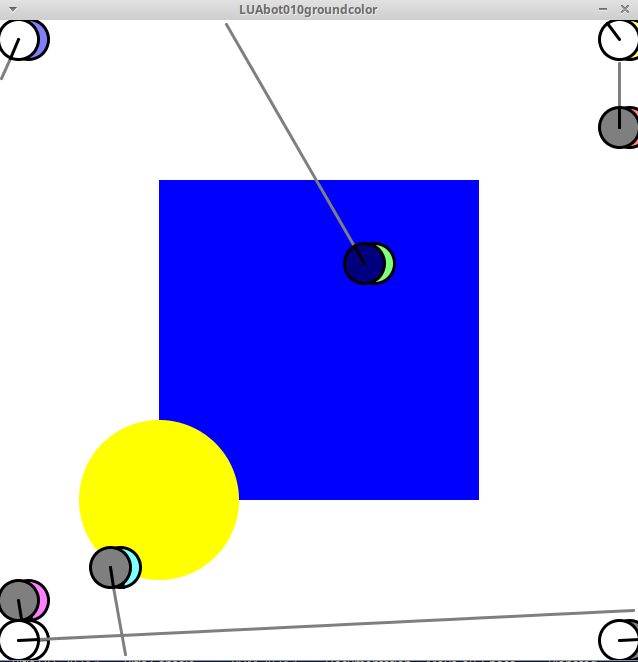
Bild 0-2: Bildschirmfoto eines Simulationsdurchlaufs / Screenshot of Simulation
LUA-Skript welches das Verhalten beschreibt / LUA-Script Describing Behavior
function behavior(col,colwall,d,dr,dg,db,pr,pg,pb,mem0,mem1,mem2,mem3,mem4,mem5,mem6,mem7,mem7,mem8,mem9)

    countdown=mem0

    v=0
    w=0
    r=pr/2
    g=pg/2
    b=pb/2
    if ( (col==1 or colwall==1) and countdown==0) then
        countdown=20
    end

    if ( countdown>0 ) then
        w=5
        v=0
        countdown = countdown - 1
        r=dr
        g=dg
        b=db
    else
        w=0
        v=10
    end

    mem0=countdown

    return v,w,r,g,b,mem0,mem1,mem2,mem3,mem4,mem5,mem6,mem7,mem8,mem9
end
Code 0-3: behavior.lua -- LUA-Skript welches das Verhalten beschreibt / LUA-Script Describing Behavior