Entwicklung fehlertoleranter Software für eingebettete Softwaresysteme im Wintersemester 2026/27
(EN google-translate)
(PL google-translate)
Starting Monday, September 28, we'll begin work at 9 a.m. and work until noon.
Development of Fault Tolerant Software for Embedded Realtime Systems
|
EN:
|
 02_WS2026_27 -- Einstiegsseite zum Wintersemester 2026/27 mit Angaben zu Räumen, Zeiten und den Prüfungen der einzelnen Fächer.
#1 Mo, 21.09.2026
Topics today
|
|
1. Organizational matters
|
|
2. Why do malfunctions occur in Western technology in the first place -- an anthropological perspective
I would like to help you understand what makes Western technology so special. I would like to work with you to identify the strengths and, if they exist, the fundamental weaknesses of Western technology. One way to do this is through comparison. Technical anthropology is a science that compares technologies from different cultures.
Heßler, M., Liggieri, K.: Technikanthropologie: Handbuch für Wissenschaft und Studium, Nomos, Baden-Baden 2020.
Code 0-1: Literatur zu Technikanthropologie
As an example, I will use ship navigation in the following.
 Marianne George (2012) Polynesian Navigation and Te Lapa -- "The Flashing", Time and Mind: The Journal of Archaeology, Consciousness and Culture, 5:2, 135-173, aufgerufen: 22.09.2025, url: https://www.researchgate.net/publication/261594890_Polynesian_Navigation_and_Te_Lapa-_The_Flashing
Example: Boatbuilding in Taumako, documentary film by Michael Tauchert.
mitropico.com/filter/Reihe-Magische-Welten-ZDF/Polynesien-Nomaden-der-Sudsee
Visual documentation
vaka.org -- Taumako Projekt
Navigation with Te Puke Booten -- Dr. Mimi George
https://www.vaka.org/blog/categories/navigation
ÜBUNG
NEW FORMULATED QUESTIONS:
|
1)

POLYNESIAN: nature observation: stars / wind / birds / waves
WESTERN:    scinece development, no nature, larger data set
(partial western also use nature observation)


2)

"better science"
"use of experiance"

"western more options to explore "

POLYN.: it is not only knowlegde but it is culture / way of living

WESTERN: more RELIABLE: Knowledge is in books / standardized software and Sustainability

3)

technology of navigation have nearly the same basis.
western use sea signals aswell! / use medicine package as mitigation

western tec. have a redundancy number of satelites
western tec. have rescue ships.
western tec. have save guards / save boats / have redundancy or fallback systems if one fails
western tec. have protocols where it is readable how to behave in emergency situations

Using Sextant as fallback / maps

Using stars but also ocean streams as fallback
Code 0-2: Student Answers.
|
Wave interference pattern caused by an island. Kenneth Lohmann und Graeme C Hays: Goal Navigation and Island-Finding in Sea Turtles, Journal of Experimental Marine Biology and Ecology 356(1-2):83-95 DOI:10.1016/j.jembe.2007.12.017, url: https://www.researchgate.net/publication/222699397_Goal_Navigation_and_Island-Finding_in_Sea_Turtles
see also: https://de.wikipedia.org/wiki/Polynesische_Navigation#Navigationstechniken
Clock "H5" by John Harrison, ca. 1770: https://de.wikipedia.org/wiki/John_Harrison_(Uhrmacher)
3. Introduction to the topic of fault tolerance
81_FTSD/01_Fehlertoleranz
4. Introduction to the terms "fault," "error," and "failure"
Exercise
|
5. Introduction to the term "mitigation"
6. Examples of "mitigation" in modern technology
Exercise
|
7. Division into groups of two
8. Scheduling appointments for presentations on fault tolerance patterns
9. Practical application: Smart Watch
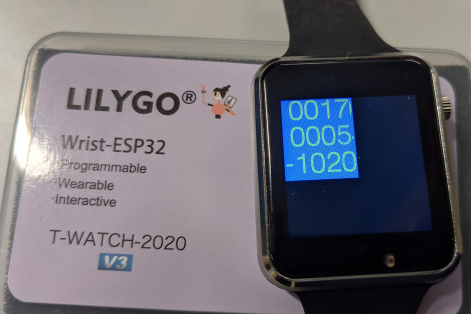
Bild 0-1: T-Watch 2020 V3 from Lilygo.
|
These are peripherals that can be controlled by programming on the watch:
|
Programming examples: https://youtu.be/xQJAm8CVC_4
T-WATCH send Acceleration to Laptop via WiFi: https://youtu.be/rJJumsD5vB8
|
Arthur C. Clarke
...in diesem Sinne:
|
Corresponding links, see:
Purchase from Lilygo: https://lilygo.cc/products/t-watch-2020-v3
TTGO_TWatch_Library V1.4.3: https://github.com/Xinyuan-LilyGO/TTGO_TWatch_Library
necessary: esp32 Board Library 2.09 (exactly this one!)
10. Discussion of possible areas in the Smart Watch where fault tolerance can play a role
#2 Mo, 28.09.2026
Topics today
|
1. Presentation of MITIGATION pattern
2. Quiz
Define the terms "fault," "error," and "failure"
3. Initial collection of ideas on possible applications for the clock and possible fault tolerance patterns that could be used in this context
DAILY LIFE

   SMART HOME: control for children devices: smartphone time etc. by our watch
   ...

SPORTS

   tracking / hiking / climbing mountains
   ...for detecting dangerous areas
   ...
MEDICINE

   Reminder for taking medicine / body sensoring ... measurement of level of insuline e.g.
   ...

DISABLED PEOPLE

   Iform about stops in busses by vibration
   ...

WORK CONTEXTS
   ...
Code 0-3: Initial collection of ideas on possible applications for the clock and possible fault tolerance patterns that could be used in this context.
4. Overview: fault tolerance pattern
81_FTSD/01_Fehlertoleranz
5. Presentation: Hello World-program with T-WATCH
6. Preliminary exercises with Java/Processing
36_Java
78_Processing
https://processing.org/
74_EmbSyst/02_Eingebettete_Systeme/03_Android/06_Processing
7. Introduction to the Processing development environment
...will be done on PCs.
8. Presentation: Starting with T-WATCH
07_TWATCH_EN -- english version.
06_TWATCH -- german version.
9. Exercise: Hello World-program with T-WATCH
Follow steps here: 07_TWATCH_EN/03_Hello_world.
#3 Mo, 05.10.2026
Topics today
|
1. Presentation of the CORRECTING AUDITS pattern
Quiz:
|
2. Systematic introduction to programming the watch
|
Programs made during the course:
#include <iostream>
using namespace std;

int count(char text[])
{
  int i=0;
  int ees=0;
  char c;
  do
  {
    c = text[i];
    if(c=='e')
      ees++;
    i++;
  } while(c!='\0');
  return ees;
}

int main(void)
{
    char text[] = "How many ees has this text?";
    cout<<text<<endl;
    cout<<count(text)<<endl;
    return 0;
}
Code 0-4: NEW EXAMPLE 1.
#include <iostream>
using namespace std;

int square(int x)
{
   int y = x*x;
   return y;
}

int main(void)
{
    int u = 5;
    int u_square = square(u);
    cout<<"u="<<u<<"u^2="<<u_square<<endl;
    cout<<"v="<<9<<"v^2="<<square(9)<<endl;

    return 0;
}
Code 0-5: NEW EXAMPLE 2.
#include <iostream>
using namespace std;
int main(void)
{
    cout<<endl<<"Hello world!"<<endl;
    return 0;
}
Code 0-6: hello.cpp
#include <iostream>
using namespace std;

int x=7; // declaration and initialization == definition
char y='4';
char text[]="My text."; // ends with 0 == ''
int main(void)
{
    cout<<endl<<"Hello world! "<<"x="<<x<<endl;
    cout<<(int)y<<endl;
    cout<<text<<endl;
    cout<<size(text)<<endl;
    return 0;
}
Code 0-7: hello2.cpp (variables)
#include <iostream>
using namespace std;

int mult(int x, int y)
{
   int z = x*y;
   return z;
}

int main(void)
{
    cout<<"4*5="<<mult(4,5)<<endl;
    return 0;
}
Code 0-8: hello3.cpp
#include <iostream>
using namespace std;

bool hasE(char text[])
{
   int index = 0;
text[0]='#';
   while(text[index]!='')
   {
       if(text[index]=='e' || text[index]=='E')
           return true;
       index++;
   }
   return false;
}

int main(void)
{
    char sentence1[] = "This is cool!";
    char sentence2[] = "This is an elephant!";

    cout<<sentence1<<" ..has an e?:"<<hasE(sentence1)<<endl;
    cout<<sentence2<<" ..has an e?:"<<hasE(sentence2)<<endl;
    cout<<sentence1<<endl;
    cout<<sentence2<<endl;

    return 0;
}
Code 0-9: hello4.cpp (call by reference)
#include <iostream>
#include <math.h>
using namespace std;
class Vektor
{
    public:
       double x,y;

       double calculateLength()
       {
           return sqrt(x*x+y*y);
       }
};
int main(void)
{
    Vektor v1,v2;
    v1.x=3.0;
    v1.y=4.0;
    v2.x=1.0;
    v2.y=0.0;
    double l1 = v1.calculateLength();
    double l2 = v2.calculateLength();
    cout<<"|v1|="<<l1<<endl;
    cout<<"|v2|="<<l2<<endl;
    return 0;
}
Code 0-10: hello5.cpp (explain classes and objects in objectoriented programing)
3. Small programming tasks for using the screen, touchscreen, button, IMU sensor, and real-time clock.
NEW EXERCISE 2026 October 05:
|
07_TWATCH_EN/04_Simplified_Commands
|
|
#include "twatch.h"
#include "variables.h"
#include "functions.h"

void setup()
{
    setupTWATCH();
    setFont(1, 255,255,255,  255,0,0);
    backlight(true);
}
bool left=true;
void loop()
{
    if(touch())
    {
        if(mouseX<width/2)
           left=true;
        else
           left=false;
    }

    if(left)
    {
       text("LEFT",10,10);
       text("#####",100,10);
    }
    else
    {
       text("####",10,10);
       text("RIGHT",100,10);
    }
}
Code 0-11: Solution 1.
#include "twatch.h"
#include "variables.h"
#include "functions.h"

void setup()
{
    setupTWATCH();
    setFont(1, 255,255,255,  255,0,0);
    backlight(true);
}
bool left=true;
void loop()
{
    if(touch())
    {
        if(mouseX<width/2)
           left=true;
        else
           left=false;
    }
    fill(255,0,0);
    rect(0,0,width,height);
    if(left)
       text("LEFT",10,10);
    else
       text("RIGHT",100,10);
    delay(50);
}
Code 0-12: Solution 2.
|
07_TWATCH_EN/04_Simplified_Commands
Exercise 1: Switch Background color by pressing the button multiple times between red, green, blue, red, green, blue, red, ... and so on.
#include "twatch.h"
#include "variables.h"
#include "functions.h"
 int state=0;
void setup()
{
    setupTWATCH();
    backlight(true);

}

void loop()
{

// ????

}
Code 0-13: Student solution.
Exercise 2: Program a type of water clock. The deviation of the clock from the horizontal position should be visualized graphically by moving a small circle on the display away from the center of the display.
#include "twatch.h"
#include "variables.h"
#include "functions.h"

void setup()
{
    setupTWATCH();
    backlight(true);
}

void loop()
{
  bool res = acceleration();

  // ????
}
Code 0-14: Student solution.
Exercise 3: Program a type of stopwatch. The stopwatch should be accurate to one-hundredth of a second. To do this, analyze in project "TWATCH_PROC023" the "functions.h" tab to find out how to obtain the elapsed time in milliseconds.
4. Small project for an application program using the internal peripherals covered so far
Implement the following project: A warning system should sound an alarm via the vibration motor and a suitable display if the watch is not held horizontally for more than 10 seconds.
#4 Mo, 12.10.2026
Topics today
|
1. Presentation of the REDUNDANCY pattern
2. Presentation of the RECOVERY BLOCKS pattern
3. New small examples for using the screen, touchscreen, button, IMU sensor, and real-time clock
3.1 Using the function editor(...)
#include "twatch.h"
#include "variables.h"
#include "functions.h"

void setup()
{
    setupTWATCH();
    setFont(1, 255,255,255,  0,0,0);
    backlight(true);
}

void loop()
{
    cursor(0,0);
    editor("Hello\n");
    editor("Editor\n");
    editor("01234567890123456\n");
    editor("17 Spalten\n");
    editor("9 Zeilen\n");
    editor("Zeile 6\n");
    editor("Zeile 7\n");
    editor("Zeile 8\n");
    editor("Zeile 9\n");
    delay(100);
}
Code 0-15: 3.1 Using the function editor(...)
 TWATCH_PROC023_B001.zip -- 3.1 Using the function editor(...)
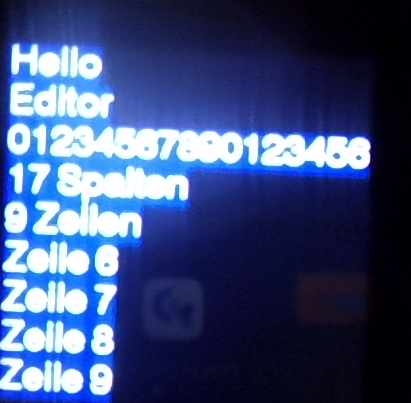
Bild 0-2: View of the clock -- 3.1 Using the function editor(...)
3.2 Using the function button()
#include "twatch.h"
#include "variables.h"
#include "functions.h"

bool zeigeText = false;

void setup()
{
    setupTWATCH();
    setFont(1, 255,255,255,  0,0,0);
    backlight(true);
}

void loop()
{

    if(button())
    {
         zeigeText=!zeigeText;
    }

    if(zeigeText)
    {
        cursor(50,100);
        editor("Hello");
    }
    else
    {
        background(0,255,0);
    }

    delay(100);
}
Code 0-16: 3.2 Using the function button()
TWATCH_PROC023_B002.zip -- 3.2 Using the function button()
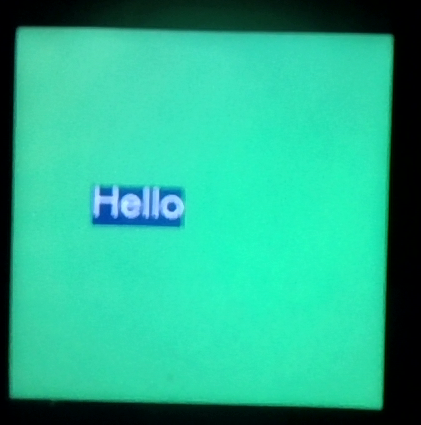
Bild 0-3: 3.2 Using the function button() ... after pressing the button once.
3.3 Using the Radio-Controlled Clock
#include "twatch.h"
#include "variables.h"
#include "functions.h"

bool zeigeText = false;

void setup()
{
    setupTWATCH();
    setFont(1, 255,255,255,  0,0,0);
    updateTime(); //RTC Zeit holen
    backlight(true);
}

void loop()
{
    int h = getHour();
    int m = getMinute();
    int s = getSecond();
    cursor(0,0);
    if(h<10)
    {
        editor('0');
    }
    editor(h);
    editor(':');
    if(m<10)
    {
        editor('0');
    }
    editor(m);
    editor(':');
    if(s<10)
    {
        editor('0');
    }
    editor(s);

    fill(255,0,0);
    noStroke();
    rect(0,120,s*4,120);
    fill(0,0,0);
    rect(s*4,120,239-s*4,120);
    delay(100);
}
Code 0-17: 3.3 Using the Radio-Controlled Clock
TWATCH_PROC023_B003.zip -- 3.3 Using the Radio-Controlled Clock
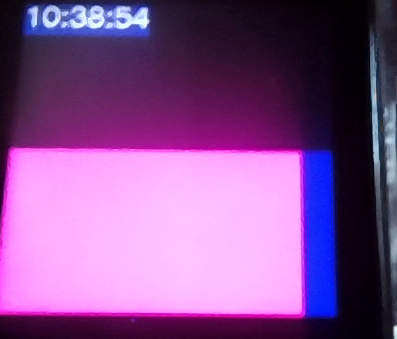
Bild 0-4: 3.3 Using the Radio-Controlled Clock
3.4 Using the Accelerometer and Vibration Motor
#include "twatch.h"
#include "variables.h"
#include "functions.h"

void setup()
{
    setupTWATCH();
    setupMotor();
    setFont(1, 255,255,255,  0,0,0);
    backlight(true);
}

void loop()
{
    acceleration();
    cursor(0,0);
    editor(absaccX);
    editor('\n');
    editor(absaccY);
    editor('\n');
    if(absaccZ<1000) editor('0');
    if(absaccZ<100) editor('0');
    if(absaccZ<10) editor('0');
    editor(absaccZ);

    stroke(0,0,255);
    if(absaccZ<300)
    {
        motor();
        fill(255,0,0);
    }
    else
    {
        fill(0,255,0);
    }
    circle(120,120,50);
    delay(100);
}
Code 0-18: 3.4 Using the Accelerometer and Vibration Motor
TWATCH_PROC023_B004.zip -- 3.4 Using the Accelerometer and Vibration Motor
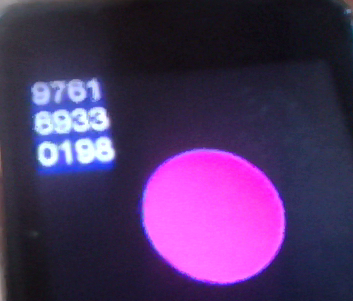
Bild 0-5: 3.4 Verwendung des Beschleunigungssensors und des Vibrationsmotors während Alarm.
4. Small projects for an application program using the internal peripherals covered so far
Exercise 1
|
Exercise 2
|
|
06_TWATCH/04_Simplified_Commands -- siehe Code 4-4.
Exercise 3
|
Note: Call millis() with a type cast to integer, for example: int t = (int)millis();
Exercise 4
|
#5 Mo, 19.10.2026
Topics today
|
Presentation of the MINIMIZE HUMAN INTERVENTION pattern
Presentation of the MAXIMIZE HUMAN PARTICIPATION pattern
Expanded Ways to Use the Smartwatch
07_TWATCH_EN/08_New_Examples -- Examples from last week: button, display, motor, IMU
07_TWATCH_EN/09_More_Possibilities -- Touch, Sound, Graphics and WiFi
07_TWATCH_EN/05_Microphone -- Microphone and Audio
07_TWATCH_EN/06_SmartHome -- Smart Home
07_TWATCH_EN/07_Temperature -- Temperature
Discussion and decision-making within the groups regarding specific project topics and appropriate fault-tolerant patterns
#2 B1/2 -- fall-Detector for elderly people -- sending message to a main system
No-activitiy-alarm (second idicaotor for something giong wrong)

#4 D1/2 person-Tracker for dangerous works -- is person okay / person's position / prevent false alarms using several sensors
Using Button or acceleration or temperature

#11 M1/2 changing room temperuture by an external device, but controlling it by the watch
Saving energy / may be light control / entering leaving several rooms...

#1 A1/2 safety / well being concerning heating
evironment temperature / health application: afordance to hydrate, check by pressing button,
alarm system

#6 F1/2 Providing alarm from outside to the watch  / fire / smoke etc...
watch repeats the alarm by vibration etc.

#5 E1/2 Reminder memo / to remind to appointments ...
Dates are updated by wifi

#13 O1/2 actively controlling light /

#8 H1/2 Warning of too extrem working / recording time (clock) and intensity (IMU) may be temperature also.

#3 detect specific resonance of the motor vibration using the acceleration sensor

#15 detect sleep paralysis -- detect / giving signal / actively waking up person

Gruppe § SOS / Helpsystem / detecting attacks from other persons

#14 P1/2 Care about people: are they here / do they take their medicine ..

X1/2 Task reminder depending of missing movement

S1/2 recording walk steps in external device..

V1/V2 Water level detection

Gruppe ? -- Wecker für die Einnahme von Medikamenten

U1/2 detecting walking steps to determine need of proteins
Code 0-19: Collection of Ideas for Project Topics and appropriate fault-tolerant patterns