Other Ways to Use the Smartwatch
(EN google-translate)
(PL google-translate)
Touch and Sound
|
#include "twatch.h"
#include "variables.h"
#include "functions.h"

#define ANZAHL 50
int punkteX[ANZAHL];
int punkteY[ANZAHL];
int nummer=0;
void setup()
{
    setupTWATCH();
    stroke(255,255,255);
    backlight(true);
}

void loop()
{
    if(touch())
    {
        punkteX[nummer] = mouseX;
        punkteY[nummer] = mouseY;
        nummer++;
        nummer%=ANZAHL;

        sound();
    }
    background(0,0,0);
    //for(int i=0;i<ANZAHL-1;i++)
    //   line(punkteX[i],punkteY[i],punkteX[i+1],punkteY[i+1]);
    for(int i=0;i<ANZAHL;i++)
    {
       if(punkteX[i]!=0 || punkteY[i]!=0)
       {
          circle(punkteX[i],punkteY[i],10);
       }
    }
    delay(100);
}
Code 0-1: Touch und Sound
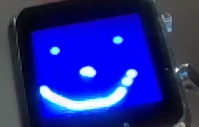
Bild 0-1: Touch und Sound
 TWATCH_PROC023_TouchTone.zip -- Touch and Sound
Analog Clock from the Basic Project
|
#include "twatch.h"
#include "variables.h"
#include "functions.h"

char UHRZEIT[] = "00:00:00";

void setup()
{
    setupTWATCH();
    setFont(1, 255,255,255,  255,0,0);
    updateTime(); //RTC Zeit nehmen
    backlight(true);
}

void loop()
{
        clear();

        noFill();
        stroke(255);

        circle(width/2,height/2,width/2-3);
        triangle(width/2,height/2-height/4,width/2-width/8,height/2+height/8,width/2+width/8,height/2+height/8);

        stroke(255);
        circle(width/2-width/4,height/2-height/4,width/8);
        circle(width/2+width/4,height/2-height/4,width/8);

        fill(0,0,255);
        if(getSecond()%2==0)
        {
          circle(width/2-width/4+width/16,height/2-height/4,width/16);
          circle(width/2+width/4+width/16,height/2-height/4,width/16);
        }
        else
        {
          circle(width/2-width/4-width/16,height/2-height/4,width/16);
          circle(width/2+width/4-width/16,height/2-height/4,width/16);
        }

        UHRZEIT[0]='0'+getHour()/10;
        UHRZEIT[1]='0'+getHour()%10;
        UHRZEIT[3]='0'+getMinute()/10;
        UHRZEIT[4]='0'+getMinute()%10;
        UHRZEIT[6]='0'+getSecond()/10;
        UHRZEIT[7]='0'+getSecond()%10;

        text(UHRZEIT,width/4+11,height-height/4);


        float alpha = (((float)getHour12()/12.f)*TWO_PI);
        float beta  = (((float)getMinute()/60.f)*TWO_PI);
        float gamma = (((float)getSecond()/60.f)*TWO_PI);
        stroke(0,0,255);
        line(width/2,height/2,width/2+((width*3)/10)*sin(alpha),height/2-((width*3)/10)*cos(alpha));
        stroke(0,255,0);
        line(width/2,height/2,width/2+((width*4)/10)*sin(beta),height/2-((width*4)/10)*cos(beta));
        stroke(255,0,0);
        line(width/2,height/2,width/2+width/2*sin(gamma),height/2-height/2*cos(gamma));

    delay(100);
}
Code 0-2: Analog Clock from the Basic Project
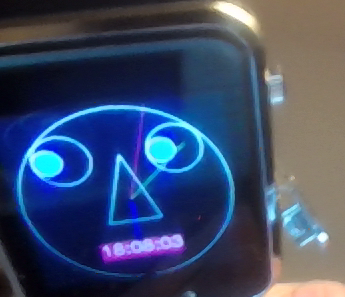
Bild 0-2: Analog Clock from the Basic Project
TWATCH_PROC023_Analoguhr.zip -- Analog Clock from the Basic Project
A minimalist program for exchanging messages between two watches via Wi-Fi
|
|
Depending on the hotspot used, you must adjust the declarations for char hotspot[] and char password[] in the program.
|
For the second clock, the values for udpport and serverPort must be swapped!
|
#include "twatch.h"
#include "variables.h"
#include "functions.h"

char hotspot[]  =  "hotspotK"; //Anpassen!
char password[] =  "12345678"; //Anpassen!
IPAddress serverIP(10, 42, 0, 255); //Broadcastadresse Anpassen!
int udpport    = 6001; //Bei zweiter Uhr Werte bei udpport und serverPort VERTAUSCHEN!
int serverPort = 6000; //Bei zweiter Uhr Werte bei udpport und serverPort VERTAUSCHEN!

char empfang[]  = "0123456789";
uint8_t gruss[] = "000. Gruss";
int count=0;

void setup()
{
    setupTWATCH();
    setupWIFI(hotspot,password,udpport);
    setupMotor();
    setFont(1, 255,255,255,  255,0,0);
    backlight(true);
}

void loop()
{
    if(!WIFIOKAY)
    {
       setupWIFI(hotspot,password,udpport);
    }

    if(WIFIOKAY && button())
    {
        udp.writeTo(gruss,strlen(empfang),serverIP,serverPort);
        count++;
        count%=1000;
        gruss[0] = '0'+count/100;
        gruss[1] = '0'+(count/10)%10;
        gruss[2] = '0'+count%10;
    }

    if(WIFIOKAY && udp.listen(udpport))
    {
            udp.onPacket([](AsyncUDPPacket packet)
            {
                uint8_t* data = packet.data();
                for(int i=0;i<strlen(empfang);i++)
                    empfang[i]=data[i];

                background(0,0,0);
                cursor(0,0);
                editor("Empfangen:\n");
                editor(empfang);
            });
    }

    delay(100);
}
Code 0-3: A minimalist program for exchanging messages between two watches via Wi-Fi
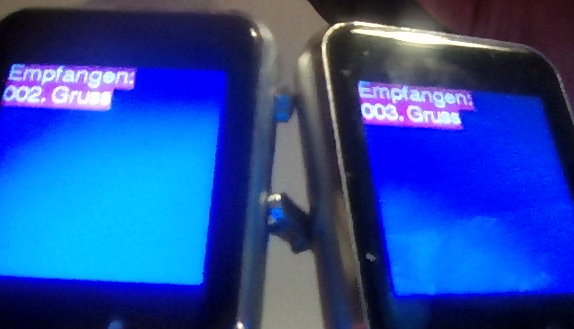
Bild 0-3: A glance at the clocks after exchanging several messages.
TWATCH_PROC023_C001.zip -- A minimalist program for exchanging messages between two watches via Wi-Fi